
FIDO2 and WebAuthn: Login without a Password
Stolen user and password combinations continue to be one of the main reasons for compromised systems and infrastructures today. Billions of access data are stolen annually, which, according to the 2019 Data Breach Investigations Report by Verizon, serve as the basis for data leakage in 29% of reported cases. The dark figure is likely to be several times higher.
That is why two-factor authentication (2FA) has been recommended for a long time, which protects the account and the data through a second factor in the event of a lost password.
When a user logs into a service with a set-up second factor, the second factor is requested for authentication in addition to the password.
Two-factor authentication can be carried out via various paths. For example, a TAN can be sent via SMS or email, or generated via a suitable app on the smartphone. However, all these methods must solve one central circumstance:
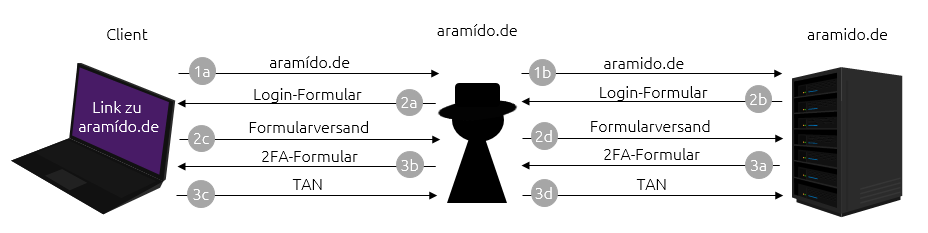
To steal access data, forged messages or websites are usually sent to people. In this process, they are induced to disclose sensitive information. This approach is referred to as phishing. Phishing attacks are becoming more and more professional, and even two-factor authentication can be overcome. Figure 1 illustrates the capture of a TAN by a phishing page. In step 1, the website is first called up and a login form is then returned. Then, in step 2, the access data (username and password) are requested and transmitted. Subsequently, in step 3, the second factor, for example a TAN via SMS, is requested. The information is then immediately used by the attacker in the background to log in to the actual service.
To enable an even more secure authentication, which on the one hand can eliminate the possible loss of a password and on the other hand is phishing-resistant, FIDO2 in combination with WebAuthn was established. The authentication protocol FIDO2 consists of a challenge-response procedure using asymmetric cryptography (public and private keys). A challenge (here a random string of characters) is sent from the web service to the user, which the user signs digitally with the private key. The digital signature can then be used to verify the response to the challenge with the help of the public key on the server. This allows the authorship to be uniquely determined. WebAuthn is a JavaScript API that enables a browser to communicate with the web service via FIDO2 and a so-called Authenticator. The Authenticator stores the cryptographic keys for the user accounts and performs the cryptographic operations for creating keys and signing the challenge. This procedure can be used as a first (replacement of a password) or second factor (phishing-resistant 2FA with the optional query of a biometric characteristic/PIN).
Terms
| Asymmetric cryptosystem | A cryptographic process in which no common key is shared between two communication partners. In addition to a private key, which must remain secret, a public key is generated. This can be shared publicly and serves as a key to communicate encrypted with the owner and to check digital signatures of the owner. |
| Challenge | A challenge in this case is a random string of characters which is signed by the client with the help of the Authenticator. This ensures that only this one authenticator knows the response to the challenge. |
| FIDO2 | A standard for strong and hardware-based authentication using asymmetric cryptography. |
| WebAuthn | A JavaScript API that enables FIDO2 authentication via the web browser |
| Relying Party | The Relying Party is the web service at which the user wants to authenticate. |
| Authenticator | External authentication device, for example Yubikey, Titan Security Key, Nitrokey. Keys can be generated and stored on these. In addition, cryptographic operations are performed directly on them. |
| 2FA | Two-factor authentication is a method to confirm the identity of a user through a combination of two different factors. Mostly, the password ("something you know") is combined with "something you have" (for example, an Authenticator) or "something you are" (biometric characteristic such as a fingerprint). |
Login without a password? But how?
For the FIDO2 procedure, the prerequisites must first be created. In addition to a web service that supports FIDO2, a supported client must also be used on the user side. As of today, most common web browsers such as Mozilla Firefox, Google Chrome, Microsoft Edge, as well as Safari are equipped with a WebAuthn interface. Further supported browsers can be determined via Can I use WebAuthn?. Another important element is the Authenticator. The Authenticator, for example the Yubikey, houses the key material for individual services and performs the necessary cryptographic operations. As a result, the secret does not leave the Authenticator and is protected from third parties.
Generate a key pair and register a user
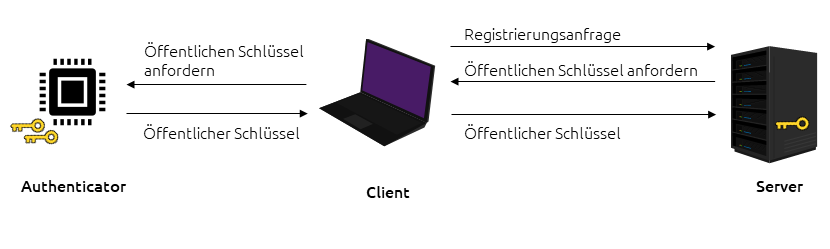
If a user wants to register on a website (referred to as a Relying Party), then ...
- ... the user first initiates the registration process.
- The Relying Party provides a challenge and asks the user's browser for a new key pair.
- After the Authenticator receives confirmation from the user (for example by flashing and pressing the Authenticator), a new key pair is generated. A new key pair is generated per user account on a website.
- The public key and optionally a signed certification are sent back to the website.
- The server stores the public key with the corresponding user ID.
Login with one click
After registration, the user can authenticate themselves at the service.
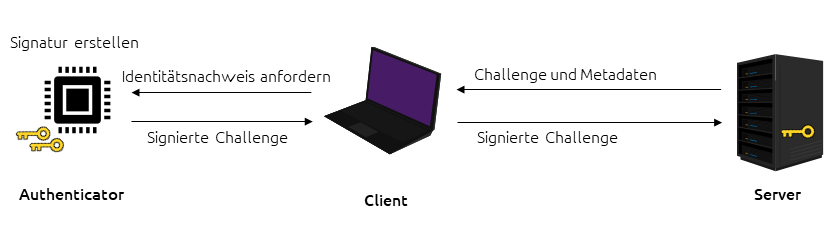
- The user calls up the login form and initiates the login.
- The website generates a unique challenge and sends it to the client.
- The origin of the challenge is validated.
- The user confirms the login, for example by pressing the Authenticator.
- The Authenticator generates a signature (using the private key) of the challenge and sends it back via the web browser.
- The website verifies the signature with the public key and, if successful, the user is logged in.
Those who already possess an Authenticator with FIDO2 support can test this procedure with different settings at WebAuthn.io. The use as a second factor is already offered by some services such as Github, 1Password, Twitter and Google. A passwordless login process is also offered by Microsoft. In addition to web services, login and authentication via SSH with an authenticator is supported starting with Ubuntu 20.04.
Advantages for Companies and Users
In addition to the advantages for the security of one's own account, providers of web services can also benefit from the use of this procedure. Customers no longer have to remember passwords for their accounts. This reduces the effort to open an account with the offered service. A click on register is sufficient, without having to think of a tedious password. Furthermore, trust in the own service is increased, as the risk of password loss is eliminated. Forgotten passwords also belong to the past with FIDO2 and the support is massively relieved. According to Yubico, password resets are the largest cost factor in support. Particularly, this type of authentication is resistant to phishing, in contrast to 2FA with SMS or an app. The defense against phishing is ensured by three mechanisms. First, the origin of the data from the server is verified. In the browser, it is checked whether the set ID of the Relying Party fits the current domain. If this is not the case, for example when visiting a phishing website, the process is aborted by the client. The response to the challenge of the server is then protected from manipulation on the way to the server by a forgery-proof signature. Furthermore, the challenge is only valid once and cannot be reused.
Conclusion
Since passwords are still stolen daily and used for break-ins into systems, it is important to minimize the risk of theft of access data and to reduce the impact after a loss. To achieve a good level of protection, so-called Authenticators can be used, which provide a secure authentication mechanism through cryptographic proofs. Thus, users can log in to web services in a secure way, also passwordless, without much effort and are protected by a second factor in the form of a physical Authenticator. To enable this very secure authentication for all services, companies must also provide FIDO2 registration. Because on the user side, passwordless authentication with an Authenticator is already represented in all known browser manufacturers and other systems (such as Ubuntu 20.04).

On 23.07.2020 in the category Communication Security published.