
HTTP Security Headers Protect Your Visitors
Website operators often invest significant effort into protecting their own internet offerings from attacks. A well-thought-out architecture and regular penetration tests can achieve a high level of security. However, these measures usually focus only on the server side and communication. The user on the client side typically has to ensure their own security.
HTTP Security Headers
To nevertheless protect their users from attacks when using their own internet offering, website operators can employ so-called security headers. These are HTTP response headers that provide security instructions to the browser.
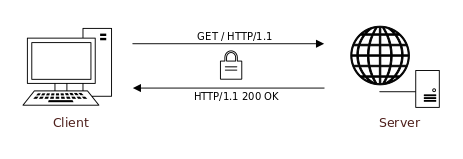
Simplified, a communication between browser (client) and server proceeds as follows, with the security headers highlighted in green:
Client Request
GET / HTTP/1.1
Host: aramido.de
Server Response
HTTP/1.1 200 OK
Date: Tue, 09 Aug 2016 09:04:07 GMT
ETag: [...]
X-Content-Type-Options: [...]
Strict-Transport-Security: [...]
X-Frame-Options: [...]
Content-Security-Policy: [...]
X-XSS-Protection: [...]
Set-Cookie: PHPSESSID=[...]; path=/; domain=aramido.de; secure; HttpOnly;
Transfer-Encoding: chunked
Content-Type: text/html; charset=UTF-8

<!DOCTYPE html>
<html lang="en">
[...]
</html>
Despite securing the web application, attacks such as clickjacking, SSL stripping, and cross-site injections are still possible. Some of these occur on the browser side, and the user would have to recognize these attacks themselves. For this reason, a website operator can instruct the browser via security headers, for example, to only access a site via the https protocol or to not allow inline JavaScript within the website.
Below, all HTTP security headers are presented. Depending on the situation, we recommend using all of these headers.
1. Strict-Transport-Security
HTTP Strict Transport Security (HSTS) instructs the browser to access the website only via secure https connections, thereby protecting, for example, against SSL stripping attacks. To be aware of this instruction, the client must, of course, have accessed the website at least once. However, there is a solution for this: it is possible to have your domain entered into a Preload List, so that a freshly installed browser already knows which sites should only be accessed via https.
Example
Strict-Transport-Security: max-age=31536000; includeSubDomains; preload
2. Public-Key-Pins
Public Key Pinning (HPKP) is a mechanism that prevents the misuse of SSL certificates and thereby significantly reduces the risk of Man-in-the-Middle (MITM) attacks. Only recently, it was again possible to issue certificates for arbitrary domains. Through key pinning, the administrator can inform the browser which certificates may be used for encrypted communication within a certain period. If a different certificate is used whose signature is unknown to the browser, the connection is rejected. The protection takes effect after the first connection has been established and the header has been transmitted.
Example
Public-Key-Pins: pin-sha256="Xij2j0o8bKDyEgvB5G4j1Qv0rIi8TSBHBC02B3clUVq="; pin-sha256="YgGWX7JFtb+h6Ctb51sPZiWo3gw9Fr+uJgwmI+TcKLb="; report-uri="http://example.com/pkp-report"; max-age=1209600; includeSubDomains
3. X-Frame-Options
Using the X-Frame-Options header, so-called clickjacking attacks can be avoided by preventing browsers from displaying a website within a frame. If it is not intended that your website be embedded in an iframe on another website, activate this security header.
Example
X-Frame-Options: deny
4. X-XSS-Protection
The X-XSS-Protection security header controls the browser filter against Cross Site Scripting. This can thwart some, but not all, XSS attacks. Consequently, this security measure provides an additional layer for a defense-in-depth approach (onion principle).
Example
X-XSS-Protection: 1; mode=block
5. X-Content-Type-Options
Certain browsers can be instructed via this header to use only the content type set via another HTTP header for the type interpretation of a file.
Example
X-Content-Type-Options: nosniff
6. Content-Security-Policy
Content Security Policy (CSP) headers can protect users from a large number of attacks and are probably the most powerful security headers. Through them, the browser can be instructed, for example, from which sources images may originate or to which URLs forms may send data.
Example
content-security-policy: default-src 'none'; style-src 'self'; img-src 'self' https://cdn.aramido.de; report-uri /csp/report
7. Expect-CT:
With the Expect-CT header, the server can inform the client that the certificate delivered with encrypted connections must meet the requirements for Certificate Transparency . More precisely: the certificate must contain a signed timestamp indicating when the certificate was transmitted to a Certificate Transparency log. If no timestamp is included, it is highly likely that the certificate is unauthorized, and the confidentiality and integrity of the encrypted connection are compromised.
Several directives are offered to control the behavior of the Expect-CT header:
max-age: Specifies the time in seconds for which the header information should be stored in the browser and considered valid. This directive is mandatory.report-uri: Contains an absolute URL to which errors can be reported. HTTPS must be used.enforce: Enforces the validation of the certificate. In case of an error, if specified, an error report is sent and the connection is rejected.
Examples
Expect-CT: max-age=108000, enforce, report-uri="https://report.aramido.de/Expect-CT/report"

Expect-CT: max-age=108000, enforce
Expect-CT: report-uri="https://report.aramido.de/Expect-CT/report"
With the enforce directive, verification can be forced. In case of an error, the connection is rejected and a notification is generated, provided a report-uri was specified.
8. Feature-Policy
With the help of the Feature Policy header, various browser functions can be controlled granularly. Basically, the Feature Policy header consists of a directive and control options. The directive describes the function to be used. The following browser functions can be restricted with the Feature Policy header:
- autoplay
- camera
- display-capture
- document-domain
- encrypted-media
- fullscreen
- geolocation
- microphone
- midi
- payment
- vr
These directives can appear with four different control options:
*: Allows the use of the function in all areas of the application (including iframes).'self': Allows the use of the function in all areas of the application, except for iframes embedded from a different URL.'none': Use of the function is not possible.'src': Use of the function is only possible if the source is listed here.
The site https://caniuse.com shows the distribution of the Feature Policy header in various browsers.
Example
Feature-Policy: display-capture 'none'; document-domain 'none'; geolocation 'none'; microphone 'none'
Checking Security Headers
Various tools are available on the internet to check your own internet offering. The HTTP Observatory offers the possibility to have a website checked by several scanners at once. For automatic tests, it is naturally important to verify and interpret the results.
Conclusion
Those who use security headers are taking measures not only on the server side and the communication level, but also on the user side. Modern browsers can handle security headers and protect the user from attacks such as SSL stripping, Man-in-the-Middle, and clickjacking. While the use of security headers will not provide absolute security, it is a correct step towards defense-in-depth.
Update 04.05.2020
An error had crept into the Expect-CT header description. It stated: if a timestamp is included, it is very likely a forged or invalid certificate. Correctly, it must be that if no timestamp is included, it is very likely a forged or invalid certificate. Thanks to the attentive reader.

On 09.07.2019 in the category Communication Security published.