
Help, My Computer Is Being Held Hostage! The Ransomware Crisis Plan.
You were always careful with email attachments, the anti-virus software is always up to date, and yet it struck: the cryptotrojan! Usually, you only find out when it's actually too late and all files are encrypted. For most trojans, it's only after they've finished their work that they signal their existence through changed desktop backgrounds or opened text files. We explain how best to react in this situation.
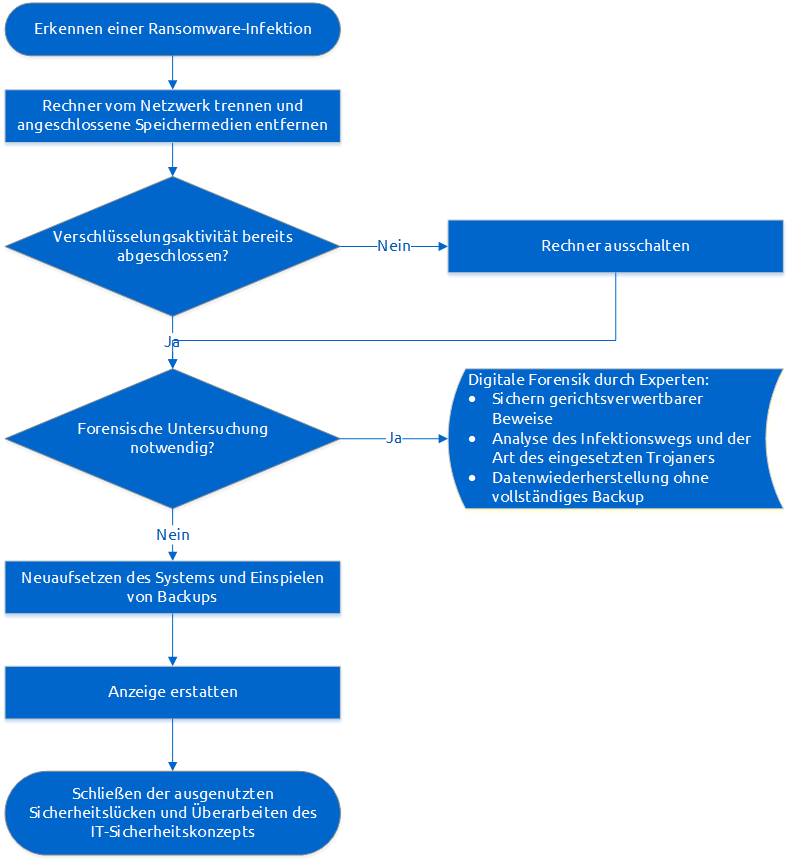
1. Immediate Response
If you notice the first signs of encryption activities on your computer, e.g., slow response or changing file names, you should react quickly and take immediate measures. If the trojan is busy encrypting data and no ransom demand has yet appeared, you should switch off the computer as quickly as possible, disconnect it from the power supply if necessary, and do not restart it. Also disconnect connected storage media such as USB sticks or external hard drives. If you were only made aware of the trojan by the ransom demand, the encryption of files is usually already complete. Nevertheless, you should disconnect the computer from the internet and intranet, but you can keep it running to determine the type of trojan and back up files if possible. The easiest way to disconnect from the internet is by pulling the network plug or disabling the WLAN adapter.
If the computer is part of a corporate network and, for example, has access to shared network drives, you should check how far these drives and other computers are affected. In this case, we recommend contacting a security expert from aramido: Contact us .
2. Decisions on Further Action
Before you take further steps, you should clarify a few questions:
- Should the incident be documented legally and technically?
- Are backups available and how old is the most recent backup?
- What value do the encrypted files have for you?
The first question determines how cautious the system recovery must be. If professional digital forensics is to be carried out to secure admissible evidence in court, to rescue files from the working memory or to determine the path through which the trojan reached the computer, you should have this work carried out by a specialist. The IT security experts at aramido will perform professional digital forensics for you. Specifically for an acute ransomware infection, we offer incident response and digital forensics for Ransomware .
Even if you have not carried out evidence preservation, you should report the extortion to the responsible police department. In this way, you contribute to increasing the investigative pressure on the perpetrators of the ransomware wave.
Next, you should check whether a functional backup is available and how many files have changed since the last backup.
If you can estimate how many files may have been lost and what value the data stored in them has for you, you can decide whether it is worth bringing in a security expert. They can investigate whether individual files can be restored and advise you on whether you should comply with the extortionists' ransom demand. We will also report on this topic in the course of the ransomware article series.
For private individuals, it is usually only worthwhile to seek professional help if there is a threat of losing very valuable files. For companies, however, it is not only about saving valuable business data, but also about avoiding similar cases in the future. Furthermore, companies are obliged to store business data for a certain period and to take appropriate measures for this purpose.
3. System Recovery
After you have possibly performed a backup of the current hard disk state in the previous step, it is then advisable to completely reinstall the system. Only by deleting the suspected malware can you still not be sure that the trojan has not spread further within the system. Have the reinstallation carried out by your system administrator or follow the information on the website of your operating system manufacturer. For a sound diagnosis, identify the type of infection to be able to assess the scope of the infection and, for example, rule out a change in the firmware.
4. Preventing Recurrence
After incident response and disaster recovery, the next step is the post-mortem of the incident to avoid a recurrence. It is of interest how the trojan got onto the system. Typically, encryption trojans infect systems through infected email attachments or as drive-by downloads when visiting infected websites. How to protect yourself preventively against infection with a trojan will be discussed in another part of this article series .

On 09.06.2016 in the category Data Security published.