Secure Software Updates
As digital forensics experts , we are called in when IT systems have already been breached. Attackers usually follow the same pattern: they exploit known vulnerabilities in unpatched applications. This problem can be fought from two sides. IT managers must, on the one hand, ensure that their applications are kept up to date. On the other hand, software manufacturers should offer their users automatic updates. But beware! Automatic update mechanisms are closely examined by both malicious hackers and us penetration testers . If they are insufficiently implemented, they open up a variety of potential attack points. Therefore, in this article, we want to discuss what to look out for when implementing secure, automatic software update mechanisms.
Who is affected?
Software is used in a wide variety of ways today. On the one hand, we speak of classic desktop software, which is installed, for example, as an exe file on a Windows PC. The PC itself is controlled by the operating system. Below the operating system is the firmware as a link to the specific hardware. It is used in various electronic devices such as WLAN routers, printers, and household appliances. On mobile devices such as tablets and smartphones, application software comes in the form of apps. These are usually installed via app stores from different providers. A particularly important and critical piece of software is the web browser. Through it, we call up web applications. These are, for example, content management systems (CMS) or customer relationship management systems (CRM). These web applications are also often referred to as Software-as-a-Service offerings. They run together with other services such as email services on servers.
There is no error-free software
After showing how diverse the use of software is, the next question is why software has to be updated at all. Every software developer sooner or later comes to the realization that it is almost impossible to develop error-free software due to the complexity of software. Some errors only affect the functionality of the software, others lead to serious security vulnerabilities. When these errors become known, the software must be updated and the update brought to the customer. In the case of Software-as-a-Service (SaaS) solutions, the end customer does not have to worry about the update, but the SaaS provider is then obliged to update the web applications on its servers.
From 0-Day to Update
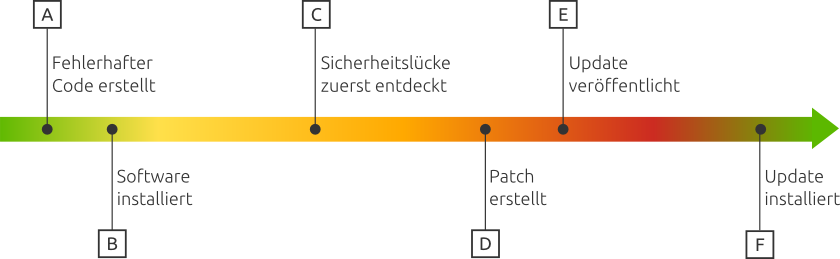
The graphic above shows the path a security vulnerability takes from its creation to its remediation. At point A, the error is inserted into the software code, which usually happens unintentionally. The error becomes relevant to the user at point B with the installation of the software. At point C, the error is discovered for the first time by someone. This can be the manufacturer itself or an external third party. The external party can keep the security vulnerability for themselves, report it to the company, sell it profitably on the black market, or go directly to the public. As soon as the manufacturer learns of the security vulnerability, they have the opportunity to fix the error with a patch. This was developed at point D and published at point E. At point F, the software update with the bugfix was finally installed by the operator of the software. Their system is now no longer susceptible to the security vulnerability. Before this was published (sometime between point C and E), it is called a 0-Day. This is a security vulnerability that is known only to the discoverer or a small circle of people. After publication of the security vulnerability, it is considered generally known. Security researchers then record an increasing number of attacks attempting to exploit this security vulnerability in vulnerable systems.
Principles for secure software updates
As a software developer, you want to avoid building security vulnerabilities into your code in the first place. But if they have arisen, the period between discovery and update should be as short as possible.
To keep the time span from the publication of a software update to its application by all users as small as possible, automatic updates have become a best practice. However, the following points should be observed when implementing automatic updates.
1. Automatic updates by default
The installation of updates always carries the risk that systems will be disrupted. It is not for nothing that for a long time the maxim "Never change a running system" prevailed among system administrators. Using this as a pretext not to install security updates at all is very dangerous – especially if the systems are connected to the internet. Since there are, however, scenarios in which the administrator must be able to determine the timing of an update, the application should offer this option. In this case, the administrator is notified, after which they can install the update at a time of their choice. The default variant should, according to the Security-by-Default principle, be the automatic update for security-critical patches.
2. Updates via secure channels
A frequently observed vulnerability in software downloads and updates is the download via unencrypted connections such as http. Here, the update can be replaced by malware through a man-in-the-middle attack. Especially for automatic updates, which may be downloaded over an insecure network, it is important to rely on secure transport channels such as https connections.
In addition to the integrity of the software, the availability of software updates is another dimension of software security. So that attackers cannot prevent access to updates via DDoS, updates should be made available via a wide network (for example, via mirror servers or BitTorrent). Likewise, updates must be verified so that it can be ensured that they actually come from the manufacturer.
3. Verified updates
Updates are not always downloaded by users from the original source and even this could be compromised. Therefore, updates should always be verified by a digital signature, which is checked against the public key delivered with the software before installation. For signing software, GnuPG or other modern cryptographic procedures based on elliptic curves are suitable. For particularly critical open source software, the path of the reproducible build process has also established itself to detect manipulations between open source code and packaged software. To prevent targeted attacks on individual users, it is also possible to ensure the consistency of updates between all users via a public, write-only log. Further information on the implementation is described in the triangle of secure code delivery.
Conclusion: Secure software updates as part of the Secure Development Lifecycle
Providing secure, automatic software updates is not a trivial problem. It is part of a secure software development process. aramido GmbH helps you implement security according to the principle of Security-by-Design along the entire software lifecycle . The security experts from aramido look forward to advising you on your software development project.

On 05.01.2017 in the category Software Security published.